
Create personalized email variations automatically using Spintax. Spintax lets you rotate words, phrases, or sentences within a single email template, making your messages less repetitive.
This guide explains how to use Spintax, combine it with merge fields and Custom Values, and test your emails before sending.
TABLE OF CONTENTS
- What is Spintax
- Why Use Spintax?
- Spintax and Email Deliverability
- Spintax Syntax and Examples
- How to Use Spintax in Emails
- Using Custom Values Inside Spintax
- Important Considerations
- Frequently Asked Questions
What is Spintax
Spintax is a text-formatting feature that generates different versions of email content from a single template. One of the available text options is randomly selected when the message is sent, allowing you to create varied messages without writing separate emails.
Spintax can be used in email content across:
Conversations
Bulk Actions
Workflows
Email Builder
Why Use Spintax?
Spintax is especially useful for cold email outreach, follow-ups, appointment reminders, and automated conversations.
Spintax helps you:
Create unique message variations automatically.
Reduce repetitive content across campaigns.
Personalize messages at scale.
Test different messaging styles.
Improve engagement with more natural communication.
Spintax and Email Deliverability
When every recipient receives the exact same email, mailbox providers may identify the content as highly repetitive.
Spintax helps create variations in your messages by rotating words, phrases, and sentences. This can help reduce content uniformity across large campaigns.
For example, instead of sending the same greeting to every recipient:
Hey {{contact.first_name}},
You can use Spintax to rotate greetings:
{SPIN|Hi|Hello|Hey} {{contact.first_name}},
Important
Spintax should be used thoughtfully. Modern email providers can recognize simple word substitutions, so changing only greetings may have limited impact.
For the best results:
Spin complete phrases or sentences instead of single words.
Combine Spintax with personalization and Custom Values.
Keep all variations natural and conversational.
Use Spintax to support testing and content variation, not as a replacement for good email practices.
Spintax Syntax and Examples
Spintax uses curly braces, the SPIN keyword, and vertical bars (|) to separate text options. One option is randomly selected whenever the message is sent.
Basic Syntax:
{SPIN|Hello|Hi|Hey}
Possible Outputs:
Hello
Hi
Hey
You can also combine Spintax with contact merge fields to personalize emails.
Example:
{SPIN|Hello|Hi|Hey} {{contact.first_name}},
Possible Outputs:
Hello Sarah,
Hi Sarah,
Hey Sarah,
Note: Each Spintax block returns one randomly selected option. Use complete phrases or sentences when you need more meaningful content variations.
How to Use Spintax in Emails
Spintax supports email content created through Conversations, Bulk Actions, Workflows, and Email Builder.
Open the email editor.
Add your content variations inside curly braces after the
SPINkeyword. Use a vertical bar (|) to separate each option.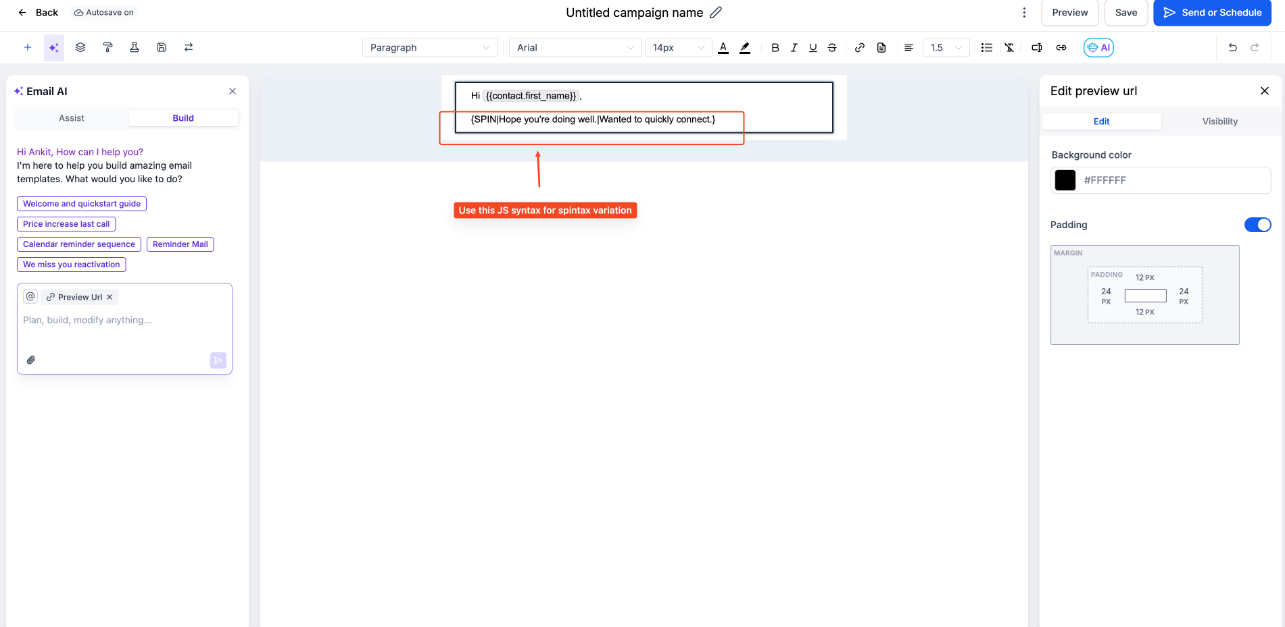
Example:
{SPIN|Hey|Hello|Hi} {{contact.first_name}}Save your message or template.
When the message is sent, one of the available options is automatically selected at random.
Using Custom Values Inside Spintax
You can include Contact Fields and Custom Values directly within your Spintax variations. Each variation can contain different merge fields, allowing you to personalize messages in multiple ways.
Example:
{SPIN|Hi {{contact.first_name}}|Hi {{contact.last_name}}}
Possible Outputs:
Hi John
Hi Smith
You can also use Custom Values within your variations.
Example:
{SPIN|Learn more about {{customvalue1}}|See how {{customvalue2}} can help your business}
Replace {{customvalue1}} and {{customvalue2}} with your actual Custom Value merge fields.
Possible Outputs:
Learn more about Website Design
See how Website Design can help your business
Tip: Each variation can contain different text, Contact Fields, or Custom Values, giving you greater flexibility when personalizing emails.
Important Considerations
Following Spintax formatting and email best practices helps ensure your content is generated and displayed correctly.
Correct Syntax: Use
{SPIN|Option 1|Option 2}with the correct braces and separators.Random Selection: One option is selected when sending. Different recipients may receive the same variation.
Supported Editors: Spintax is documented for email content in Conversations, Bulk Actions, Workflows, and Email Builder.
Merge Fields: Use the field picker to insert supported merge fields and avoid formatting errors.
Testing: Preview and test your emails before launching campaigns. Preview tools may not display every possible Spintax variation.
Deliverability: Spintax does not guarantee inbox placement or replace sender authentication and good email-sending practices.
Frequently Asked Questions
Q: Can I use multiple Spintax blocks in one email?
Yes. You can add separate Spintax blocks to different parts of your email, such as greetings, introductions, and calls to action.
Q: Will every recipient receive a different email variation?
Not necessarily. One option is randomly selected from the available variations, so multiple recipients may receive the same variation.
Q: Can I use Spintax with contact names and Custom Values?
Yes. Spintax supports contact merge fields and Custom Values in supported email content.
Q: Does Spintax prevent emails from going to spam?
No. Spintax creates content variations but does not guarantee email deliverability. Sender reputation, authentication, list quality, and engagement also affect inbox placement.